Friday, September 24, 2010

Javascript Pagination with JQuery

This script has been adapted from some other jquery pagination code found on the web.


function Pagination(){
// alert('created')
this.showPerPage = 10;
this.currentPage = 0;
this.lowestPage = 0;
this.highestPage = 2;

}

Pagination.prototype.paginate = function( content ){
this.content = content;
this.numberOfItems = content.children().size();

this.numberOfPages = Math.ceil(this.numberOfItems/this.showPerPage);

var navigation_html = '';
var current_link = 0;
while(this.numberOfPages > current_link){
navigation_html += ''+ (current_link + 1) +'';
current_link++;
}

$('#pages').html(navigation_html);
$( content ).children().css('display', 'none');
$( content ).children().slice( 0, this.showPerPage ).css('display', 'inline');
$('.page_link').css('display','none');
$('.page_link').slice(this.lowestPage, this.highestPage+1 ).css('display','inline')
$('#pages .page_link:first').addClass('active_page');
}


Pagination.prototype.goToPage = function (page_num){

if( page_num==this.lowestPage && page_num!=0 ){
// shift right
this.lowestPage = this.lowestPage - 1;
this.highestPage = this.highestPage -1 ;

}else if( page_num==this.highestPage && page_num // shift left
this.highestPage = this.highestPage + 1;
this.lowestPage = this.lowestPage + 1;
}

var start_from = page_num * this.showPerPage;
var end_on = start_from + this.showPerPage;
this.content.children().css('display', 'none').slice(start_from, end_on).css('display', 'inline');
$('.page_link[longdesc=' + page_num +']').addClass('active_page').siblings('.active_page').removeClass('active_page');
this.content.val(page_num);

$('.page_link').css('display','none');
$('.page_link').slice(this.lowestPage, this.highestPage+1 ).css('display','inline')
}
]]>


div.gadget h3{font-size:0.7em;font-weight:normal;margin-bottom:2;}
div.gadget p{font-size:0.7em;}
div.footer{position:absolute;bottom:0;display:none;}
div.footer p{line-height:70%;}
#count{font-weight:bold; }
#terms{ overflow:hidden;height:70px;font-size:.7em;overflow-y:auto; }
#terms em{float:right;}
#pages{position:absolute;right:0;bottom:2;}
#pages a{padding:1px;border:1px solid gray;margin:1px;color:black;text-decoration:none;}
.active_page{background:darkblue;color:white !important;}


Friday, September 17, 2010

No more iPhone

A little History
Around 2006 I started carrying the iphone, the first version. I loved the iPhone. There was nothing else that could even compare. The iPhone created a new standard for smart phones in my opinion.

However, once the new purchase momentum slowed it was apparent that a couple things were missing. The main thing for me was cut/copy/paste. The other issue was getting use to the paradigm of using iTunes to manage everything. It felt a little strange at first to managing photos, podcast, music, movies etc.. through an application I originally thought of as a music application. Also managing updates to my phones OS, addresses, calendar events and the rest of the stuff got shoved in to iTunes as well.

The iTunes application was a great way for me to slowly get use to the new communication channels available from the Internet. Before the iPhone I really didn't spend anytime with podcast or organizing my music. I also only dabbled with RSS readers. iTunes feels like a bike with training wheels.

I hung tight to my iPhone up till now. As of late I was carrying and still own an iPhone 3GS. The new iPhone 4GS came out and I was slowly getting device envy again. At the same time I have seen several respected colleagues move to the Android platform. Looking at all the devices that are in the market for Android I wasn't convinced that anyone had figured it out on the Android side yet.

Then this last month I received a $263 phone bill from AT&T. This is based on a plan that is suppose to be $140. If this had been the first time then I wouldn't had a problem. But this has become a repeating bill. Now the issue is with texting and admittedly was squarely my fault. My options were to add unlimited texting for something like $20 more per month or manage my texting and my wife's texting to make sure we don't ever exceed the 200 messages. Sounds like a fun problem to solve but one that I didn't feel like dealing with yet. Besides the plan is suppose to be unlimited data, why are you charging me for a text? I don't really need an answer for that question. I know why they are charging me because they can! They don't believe it matters because they have the iPhone and they know( or so they thought they did) that I wouldn't give up my phone!? Would I??? Well that is a question that I had to answer. For the past 5 years I have experienced intermittent service issues and some that have been fairly annoying and obvious.

The point of this entry
While I love Apple's products and they do a great job of making things just work, I am ready for a cheaper plan. Enter the EVO HTC Android phone from Sprint. Spring has unlimited text, data, and voice (mobile to mobile any carrier) for ....$69.95! Yep, that is right. Now how does the service coverage compare? Well I am still on my 30 day trial but I will say not one dropped call yet. I have also spoke to several other Sprint customers in the area and they have no complaints to register.

So I compromised to move from and iPhone to Android EVO? No, not at all. At first this is how I felt but after I started using the phone I couldn't put it down. The phone is so customizable! I love the idea of the widgets. I have several roles in my life ranging from father, business owner, choir bass player that the Android allows me to customize my phone to fit all these roles better. The idea of the widget allows for more practical use of front page real-estate, very important to me. So there are 100k+ apps on the iPhone market and 50k+ on Android, so what? I reasonably need about 5 applications.

The maps application on Android blows away the maps on iPhone. The FM radio is a novelty but still pretty cool. The integration with my Gmail contacts and Google Calendar are first class. No more worries about how to keep my address book and calendar on the Mac in sync with my Google products. This is done as soon as you login to the phone. Because my Google contacts have mostly been used for emailing the contact manager has always been a distant second thought. This caused duplicate entries to be created in my Google contact list. On Android when you pull the person's information up to call or message the number of other matching records get shown as possible links. A quick review of the links and "BAM!" they are all easily consolidated into one contact record. Google Contacts will no longer be a second rate contact management solution for me.

No more am I restricted by what iTunes (the bicycle with training wheels) decides to provide for me. No more will I not have the latest podcast because I forgot to sync last night with my laptop. Now the primary unit to manage my phone is my phone. I was able to use an application called doubleTwist that provides a way of importing existing iTunes resources into Android. I am still learning how to use all the features on the phone. Each day the phone becomes more customized and there by feels more like "My" phone.

On the downside, the touch keyboard and text editing could take a couple lessons from the iPhone. But definitely not that big of a deal. It would also be nice to have a hardware switch to disable sound and one other thing a better battery. The battery issue may be resolvable since I can easily pop the back off and replace it. I am contemplating buying an additional battery that I can keep charged. Not even and option for the iPhone. : )

Saturday, July 31, 2010

Spring Roo (wasting time tonight)

Okay so I sat down tonight to work on my Roo commands. I checked the version numbers to make sure I have the latest version. Of course I was one version behind so I decided to download the latest version of the software, extract it and point my ROO_HOME to the new location. Now I pop open a shell and type "roo" to fire up the Roo shell. The previous version of Roo comes up. I checked and re-checked my .bash_profile to make sure the ROO_HOME was configured correctly.

What is the point of this blog? I forgot to create the symbolic link for the roo.sh file. I had created the symbolic link earlier and forgot about it. I had to unlink the roo.sh file and create a new link before things got back to normal.

sudo ln -s path/to/spring/roo.sh /usr/bin/roo

Life is good now after loosing about an hour of time goofying with this.

Friday, July 30, 2010

Modeling External Integration Points


Developing an application that is new and has it's own database can be pretty easily done offline. By offline I mean disconnected from the client's networks and systems. Since the application is new and the database is new the developers are generally free to develop within corporate standards. It is very easy for a developer to disconnect from the corporate network and take their work somewhere else to work more productively. They are free to use tools that they have used for years and even new tools that they have found useful. What does all of this have to do with modeling integration points?

Well if you have to integrate with existing systems or third party systems then it isn't possible to disconnect from client network. It is often necessary to use a client machine to develop the code since these machines submit to heavy scrutiny and corporate security policies. License violations are also of concerns to organizations that have hundreds of thousands of dollars at stake. This can lead to a less productive developer since the tools and techniques they have developed may not be applicable on a machine absent of the technologies and tooling required. The client processes for obtaining software usually amounts to weeks of back and forth emailing and in the end usually denial of the tool or technology requested.

The other issue that comes about with external integration is the black box effect. It is complicated to describe exactly how the two systems will interact at a protocol level. There for when writing the requirement the writer simply places a black box around the integration point by saying "system A will integrate with system B and do thus and such". Wow! In those few words there is a ton of complexity that gets glossed over.

So why am I blogging about this? I have wondered for several years now if this is not just an engineering problem that needs to be solved. How many devices do we have that communicate through the USB interface. Do you have any devices that use serial, parallel, firewire, etc...? Why not treat these third party integration points as if we are designing a new device that communicates over USB? I am getting a little over my head talking about hardware but I want to give visual that everyone can understand. What makes USB work is the ability to standardize the interaction between the computer and the device.


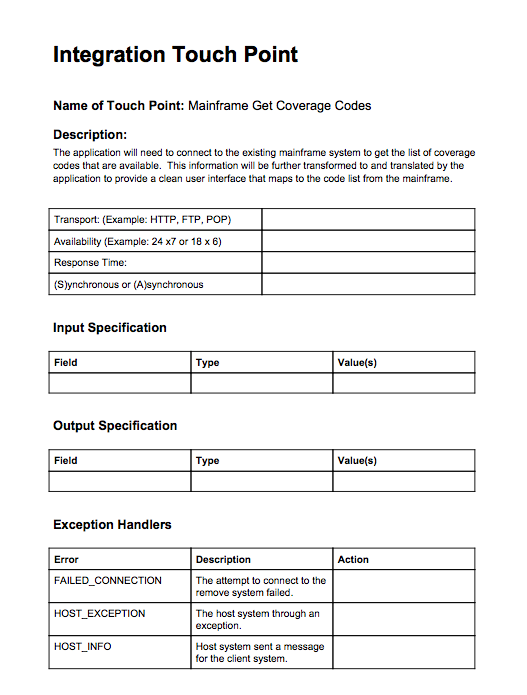
I believe that with some thought a simple process can be put in place to model these integration points. Once the model has been created and verified, say by a unit test suite, then the developer is free to move to a more productive mode of operation. Disconnecting from heavily regulated client networks and moving into a productive development environment focused on developing high quality code in a rapid and reliable manner. I have a simple form that I am developing that will document the desired interactions between systems and hopefully will turn the black box into a transparent box that can then be estimated easily and validated for accuracy.

This will also help focus the implementation effort on implementing the new system instead of the quirks of the external system. While this should eliminate the black box nature of the specification process it will not remove the need for integration testing. It will still be necessary for the system to be integration tested once dropped in place but the system can be developed off the client network. Happy developers and hopefully more cost competitive fixed bid projects. A topic for another time.

Level 1 Discussion Form

Tuesday, July 27, 2010

CSS Design in Dayton

Back in May I was working at Starbucks in Oakwood and found myself talking with a designer from Forge. I started our conversation because I noticed the high definition site he was working on behind his text editor. He explained that he was a big proponent of web standards. I mentioned that I had started trying to learn CSS and good design and that I had recently purchased a book, "Mastering CSS". He quickly told me that I had made the right purchase. I enjoyed our meeting and have bumped into him and his company several times now. The latest is in this presentation from prezi below. Prezi is great and is for another post sometime. Enjoy!!

Thursday, July 22, 2010

Chromed Bird

Just a quick mention of the Chrome Extension "Chromed Bird". It is a great little client for the browser that allows me to keep up with my twitter friends without being obtrusive to my work day. Check it out if you haven't. It has already helped me discover a half-a-dozen cool things that have been noted for later. Until recent I had pretty much tuned out of twitter just because there wasn't a good way for me to keep up with it. Now I have a little bird icon in my browser that has an unread count. I quickly view the unread and back to work I go. If I am busy I never see the little the unread notices.

This is working great for me.

Friday, July 16, 2010

What happen to the "copy to clipboard" button

Okay I was posting to my blog today when I ran across for the second time what seemed to be an updated version of the Syntax Highlighter library I am using for highlighting code. The nice little flash buttons that use to appear in the upper right hand corner are now gone. Hmm.... I don't like this. So I went to the site to find out where and why the little buttons have disappeared.


Copy To Clipboard


Since the first version back in 2004, SyntaxHighlighter has always used Flash to provide copy to clipboard functionality. At first it was Flash 8, then it was Flash 9 and now 10. It's never been a crowd pleaser and a lot of requests over the years demanded Flash to be removed.

Well, it's finally happening -- no more Flash. I think I've came up with user interface to copy code to clipboard which is a lot more intuitive and almost too easy.

If you double click anywhere on the code, the entire code view is replaces with a pre-selected view from which users can copy with a simple Ctrl/Cmd-C. Clicking anywhere else returns the view to the original state.

Grab Groovy in a Shell

I saw a tweat today about Groovy Grab and using it in a shell script. It reminded me how cool Grapes and Grab are for pulling dependencies into a Groovy file.

Here is a little script that will execute an HTTP call using Apache HttpClient and the script is executable like any other shell script on your machine ./go.sh.

  1. Create a file named go.sh

  2. copy the code below into the file

  3. from shell type "chmod +x go.sh" without parentheses


#!/usr/bin/env groovy
@Grab(group='commons-httpclient',module='commons-httpclient',version='3.1')
import org.apache.commons.httpclient.HttpClient
import org.apache.commons.httpclient.methods.GetMethod

HttpClient client = new HttpClient();
GetMethod get = new GetMethod("http://www.apache.org/");
client.executeMethod( get)
println get.responseBodyAsString

Note: The @Grab is actually annotating the first import statement.

Tuesday, July 13, 2010

AppEngine and Gradle

I have a project that was initiallly created using Eclipse and the Google Eclipse plugin. This creates a project structure where the web resources go in /war and the java resources go in /src. What I would like to be a be able to do is execute gradle build or gradle jettyRun and execute the web app from the command line. Here are the modifications that I had to make to get this to work.


apply plugin:'war'
apply plugin:'jetty'

sourceSets {
main {
java {
srcDir 'src'
}
}
}

war {
from 'war'
}

jettyRun{
webAppSourceDirectory = new File('war')
}

Saturday, July 10, 2010

Google Sitebricks

I just need to take a few minutes to talk about this. I have really started to love Google Guice the lightweight dependency injection framework. The next question was how to use Guice and some web technologies to build the simplest website with some basic capabilities.

Enter Google sitebricks. I selected sitebricks the other day while working on a report problem in another application. Today I selected it again and included it in the maven pom.xml for a project. After grabbing the dependencies I was a little turned off by how much was brought down. After all I like to think of myself as a minimalist. So off I went to find something even smaller and simpler. I even went back to using plain old JSPs, which would be a good option but I am too lazy to find the TLD's hidden amongst the piles of JSP garbage on the Internet. During this process I even revisited an old friend Wicket. I almost through the switch on using Wicket when I saw how much configuration went into the web.xml to use Guice. Forget that. Something didn't feel right.

So I went back to my last project where I used sitebricks and started looking for what was really required. The first thing was to toss maven out and use Gradle. I set the new project up with the same build.gradle used in my last project with a few less configurations and I was ready to see how small I could make things.

The good news is that I didn't need all those jars brought down initially by Maven.

Summary

google-sitebricks 200kb
google-guice2 650kb
google-guice-servlet 28kb
mvel 680kb

For around 1.5MB (Floppy size) I can start developing and can't wait to show how simple it really is to develop a Java backed page.

To see now go to sitebricks.


Thursday, July 8, 2010

Roo Investigations (Part 1)

This is the first post on a series of post that I plan on making. Roo is a new productivity product from SpringSource. Why do they need another rapid application development tool? I am not totally sure but that is one of the reason's I have started looking into it. One thing I have learned over the past few years is that the folks at SpringSource know what they are doing. When the rest of the industry was going nuts over J2EE Rod Johnson was making stuff work.

What initially brought me back to look at Roo again is the fact that Bruce Johnson the lead developer for GWT (Google Web Toolkit) and Ben Alex the creator of Roo was on stage at the Google IO keynote this year and announced a partnership between the two teams. Well I am already sold on GWT for building RIA style applications and this meant I needed to pull up the Roo home page and give it a second look.

The point that I want to make today is that the whole download of Roo is around 5MB. That is impressive. I checked the Grails download and it sits around 41MB. For someone that likes to keep there code lean and mean as possible this is very cool!

A little closer look at the spring-roo distribution reveals that they are using Apache Felix for their platform. From my 10 seconds of research on Felix it looks like an OSGi container.

The last thing of note for me about Roo is the fact that the samples come as scripts that get executed in the shell. The shell actually generates the applications on the fly. I like the fact that you can potentially write a script that will generate scaffolding for the application and the application itself. I know, I know grails create-app... but that only creates a default application and then you need to run additional commands to create domains, controllers, views, etc... granted that can all be in a single .bat or .sh but that is not the standard procedure for Grails. Roo is designed to handle this kind of generation and provides commands for creating the fields and restraints.

Loving the tab completion too!

Thursday, July 1, 2010

Chrome features

Google's new browser Chrome, or not so new now, has some great features that I have just started to explore. Pinning tabs. While I had seen folks do this I had never really thought much about it. Well today there are several windows that I keep open all the time. Gmail happens to be one of them. Why take up the full amount of tab room for something that is always there and I don't need to think about it. So if you right click on the tab and select Pin it will shrink the tab down and stack it nicely off to one side. Very cool.


Then for the next level of coolness is the Gmail extension for Chrome that allows you to turn on Desktop notification. That is one feature of Outlook that I tend to like because it helps me respond promptly to important messages. Now my Gmail can have those features too.


Chrome is a crazy fast, extremely cool browser. Thanks Google!

Creating Unix scripts with Groovy

I ran across a need to write some scripts that could run on my Mac or any Linux box. I don't regularly keep up with Groovy changes but last night I ran across this article and thought it was very cool. I know very little about writing Unix shell scripts but I have been playing in Groovy and Java for a long time. So the fact that I can create a Unix like script but in Groovy makes me very happy.


#!/usr/bin/env groovy
println("Hello world")
for (a in this.args) {
println("Argument: " + a)
}


Name your file something like "project" and execute a chmod +x project. You are now good to go and can execute the Groovy code by typing ./project. Any parameters that are passed to this file will be passed to the Groovy script using the implicit args parameter.

Wednesday, June 30, 2010

Open Wonderland

Just wanted to take a few minutes to blog about the virtual world I learned about yesterday through the FLOSS weekly podcast, Open Wonderland. I am not a gamer and I have never spent more then 5 minutes of my day thinking about games or gaming technology. On the other hand, having worked for a virtual company for several years, I find myself intrigued with the possibility of being able to create virtual 3D work environments. As I am told you can do in the popular online game Second Life, you can create an avatar and maps for your workday encounters. It seems very real and there are dynamics that can only be captured by recreating this type of environment or meeting in person. The latter can be rather expensive and time consuming.

I spent 30 minutes yesterday evening and was able to get a small environment setup using Open Wonderland. This will definitely stay on the list of things to investigate. One idea would be to create an AMI with the Open Wonderland server pre-installed and ready to use. Then by executing a command a virtual workplace could be brought online. The attendees would receive a link to the workplace which would launch a Java Webstart application to provide them with entrance.

Several things I haven't looked into yet, sound, land-line connections, and video chat.

Friday, June 11, 2010

Java Date Parsing down to the millisecond

Today I ran into a problem where a String needed to be converted into a java.util.Date. The String looked like this:


String date = "16MAR2010:09:08:27.126000";


So the code to parse the date was originally written like this:


String date = "16MAR2010:09:08:27.126000";

SimpleDateFormat format = new SimpleDateFormat("ddMMMyyyy:HH:mm:ss.SSSSSS");
Date value = format.parse(date);

System.out.println(value);


The problem was that the value printed out was several minutes ahead, 9:10 instead of 8:27. The problem turns out to be that the date parsing format does not allow more then 3 values of "S" in the milliseconds placeholder.

Solution
Strip off the last 3 zeros and change the parse pattern to


SimpleDateFormat format = new SimpleDateFormat("ddMMMyyyy:HH:mm:ss.SSS");

Wednesday, June 9, 2010

Syntax Highlighter for Bloggers

Just so I don't forget and I can easily find it again I decided I would make a blog entry on where to find Alex Gorbatchev syntax highlighter. Adding the appropriate CSS and javascript references to the HEAD of my blog on blogspot allows me to use the simple syntax of this library anytime I need to show a code snippet in my blog. Thanks Alex!!

Syntax Library

A good example of using this library on blogspot can be found here

Blogger Instructions

The basics is to click on Edit Posts > Layout > Edit HTML and add the following to the header section.


Friday, June 4, 2010

Skillcaster uses GWT

For those folks that missed my talk last night on Skillcaster here is the video that I was going to show. One of the things covered last night was why GWT was chosen to build Skillcaster. The video does a nice job of explaining some of the interesting parts of GWT and does it in a way that is more interesting them me yammering at the front of a room.


I went over the application and then technologies used to build the tool.


  • GWT - Rich UI Framwork

  • Guice - Server side injection

  • Gin - Client side injection (Javascript)

  • gwt-dispatcher - Command pattern RPC

  • gwt-presenter - MVP framwork

  • gwt-log - logging framework

  • gwt-pectin - binding framework


I will be working on getting the project moved to Google Code soon and I will send out links for everyone that may be interested in learning more or contributing to the development of Skillcaster.

Friday, May 14, 2010

Communication

The other day I came to the realization that what I need to be good at is communication. Sure my programming skills are still important and my ability to right solid code is a must, but if I can not wrap it in a useful and stunning user interface my coding may be in vain. Many times when I am reviewing applications online I spend less then 10 seconds on their website. If it doesn't load quickly and isn't impressive at first glance I move on. How do I make a stunning interface? How can I get people to pause and learn more when they visit my site?

I know that this sounds silly, but it all started when I started working for an Ad Agency in Cincinnati. As a web developer and a backend, server side programmer, I had spent years developing web based applications that typically were targeted at a single browser, internal audience. Now the applications where public facing and the browser or platform was not controlled. I learned very quickly how hard developing UI and cross browser functionality could be. This wasn't necessarily new as I have known of these issues, at least their existence , for a while now. I have been investigating Google Web Toolkit as a way of navigating around some of these issues. GWT does not provide very much in the way of UI components and most of there stuff is very basic. However if someone knows CSS and HTML fairly well then they can enhance and use the basic components to build more sophisticated components that work well across the browsers. I was determined that CSS was a must to know.

Learning CSS I started with this book. Now for the past several months I carry this thing under my arm as a reference when working on website user interfaces.


During this same period of time I was asked to give a couple different presentations. I had been to the No Fluff Just Stuff conferences and seen some really good presenters. I knew that I did not want to give a boring, read from the slide, bullet riddled presentation. How do you create a stunning presentation? Luckily I work with some really smart people that had already turned me on to a book on Zen presentations. I found it at the book store and glanced through it. It gave me some good ideas that boiled down to finding beautiful pictures from stockphoto. There had to be more then that though. I was very much interested in how to communicate using my presentation tools. After all this post is about communication.

I finally found this version of the book by the same author and it gives details starting with the idea of Zen presentations, going through the different type faces, color themes, photo/video techniques etc...


Conclusion is that I need not only to write good code, but I need to articulate my thoughts in narrative form (blog), live (presentation), and finally in my craft as stunning UI.