Okay so I sat down tonight to work on my Roo commands. I checked the version numbers to make sure I have the latest version. Of course I was one version behind so I decided to download the latest version of the software, extract it and point my ROO_HOME to the new location. Now I pop open a shell and type "roo" to fire up the Roo shell. The previous version of Roo comes up. I checked and re-checked my .bash_profile to make sure the ROO_HOME was configured correctly.
What is the point of this blog? I forgot to create the symbolic link for the roo.sh file. I had created the symbolic link earlier and forgot about it. I had to unlink the roo.sh file and create a new link before things got back to normal.
sudo ln -s path/to/spring/roo.sh /usr/bin/roo
Life is good now after loosing about an hour of time goofying with this.
Saturday, July 31, 2010

Friday, July 30, 2010
Modeling External Integration Points

Developing an application that is new and has it's own database can be pretty easily done offline. By offline I mean disconnected from the client's networks and systems. Since the application is new and the database is new the developers are generally free to develop within corporate standards. It is very easy for a developer to disconnect from the corporate network and take their work somewhere else to work more productively. They are free to use tools that they have used for years and even new tools that they have found useful. What does all of this have to do with modeling integration points?
Well if you have to integrate with existing systems or third party systems then it isn't possible to disconnect from client network. It is often necessary to use a client machine to develop the code since these machines submit to heavy scrutiny and corporate security policies. License violations are also of concerns to organizations that have hundreds of thousands of dollars at stake. This can lead to a less productive developer since the tools and techniques they have developed may not be applicable on a machine absent of the technologies and tooling required. The client processes for obtaining software usually amounts to weeks of back and forth emailing and in the end usually denial of the tool or technology requested.
The other issue that comes about with external integration is the black box effect. It is complicated to describe exactly how the two systems will interact at a protocol level. There for when writing the requirement the writer simply places a black box around the integration point by saying "system A will integrate with system B and do thus and such". Wow! In those few words there is a ton of complexity that gets glossed over.
So why am I blogging about this? I have wondered for several years now if this is not just an engineering problem that needs to be solved. How many devices do we have that communicate through the USB interface. Do you have any devices that use serial, parallel, firewire, etc...? Why not treat these third party integration points as if we are designing a new device that communicates over USB? I am getting a little over my head talking about hardware but I want to give visual that everyone can understand. What makes USB work is the ability to standardize the interaction between the computer and the device.
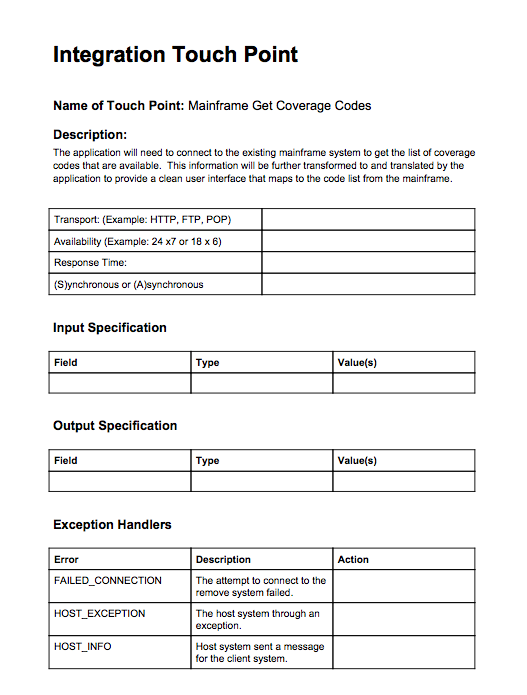
I believe that with some thought a simple process can be put in place to model these integration points. Once the model has been created and verified, say by a unit test suite, then the developer is free to move to a more productive mode of operation. Disconnecting from heavily regulated client networks and moving into a productive development environment focused on developing high quality code in a rapid and reliable manner. I have a simple form that I am developing that will document the desired interactions between systems and hopefully will turn the black box into a transparent box that can then be estimated easily and validated for accuracy.
This will also help focus the implementation effort on implementing the new system instead of the quirks of the external system. While this should eliminate the black box nature of the specification process it will not remove the need for integration testing. It will still be necessary for the system to be integration tested once dropped in place but the system can be developed off the client network. Happy developers and hopefully more cost competitive fixed bid projects. A topic for another time.
Level 1 Discussion Form
Tuesday, July 27, 2010
CSS Design in Dayton
Back in May I was working at Starbucks in Oakwood and found myself talking with a designer from Forge. I started our conversation because I noticed the high definition site he was working on behind his text editor. He explained that he was a big proponent of web standards. I mentioned that I had started trying to learn CSS and good design and that I had recently purchased a book, "Mastering CSS". He quickly told me that I had made the right purchase. I enjoyed our meeting and have bumped into him and his company several times now. The latest is in this presentation from prezi below. Prezi is great and is for another post sometime. Enjoy!!
Thursday, July 22, 2010
Chromed Bird
Just a quick mention of the Chrome Extension "Chromed Bird". It is a great little client for the browser that allows me to keep up with my twitter friends without being obtrusive to my work day. Check it out if you haven't. It has already helped me discover a half-a-dozen cool things that have been noted for later. Until recent I had pretty much tuned out of twitter just because there wasn't a good way for me to keep up with it. Now I have a little bird icon in my browser that has an unread count. I quickly view the unread and back to work I go. If I am busy I never see the little the unread notices.
This is working great for me.
This is working great for me.
Friday, July 16, 2010
What happen to the "copy to clipboard" button
Okay I was posting to my blog today when I ran across for the second time what seemed to be an updated version of the Syntax Highlighter library I am using for highlighting code. The nice little flash buttons that use to appear in the upper right hand corner are now gone. Hmm.... I don't like this. So I went to the site to find out where and why the little buttons have disappeared.
Since the first version back in 2004, SyntaxHighlighter has always used Flash to provide copy to clipboard functionality. At first it was Flash 8, then it was Flash 9 and now 10. It's never been a crowd pleaser and a lot of requests over the years demanded Flash to be removed.
Well, it's finally happening -- no more Flash. I think I've came up with user interface to copy code to clipboard which is a lot more intuitive and almost too easy.
If you double click anywhere on the code, the entire code view is replaces with a pre-selected view from which users can copy with a simple Ctrl/Cmd-C. Clicking anywhere else returns the view to the original state.
Copy To Clipboard
Since the first version back in 2004, SyntaxHighlighter has always used Flash to provide copy to clipboard functionality. At first it was Flash 8, then it was Flash 9 and now 10. It's never been a crowd pleaser and a lot of requests over the years demanded Flash to be removed.
Well, it's finally happening -- no more Flash. I think I've came up with user interface to copy code to clipboard which is a lot more intuitive and almost too easy.
If you double click anywhere on the code, the entire code view is replaces with a pre-selected view from which users can copy with a simple Ctrl/Cmd-C. Clicking anywhere else returns the view to the original state.
Grab Groovy in a Shell
I saw a tweat today about Groovy Grab and using it in a shell script. It reminded me how cool Grapes and Grab are for pulling dependencies into a Groovy file.
Here is a little script that will execute an HTTP call using Apache HttpClient and the script is executable like any other shell script on your machine ./go.sh.
Note: The @Grab is actually annotating the first import statement.
Here is a little script that will execute an HTTP call using Apache HttpClient and the script is executable like any other shell script on your machine ./go.sh.
- Create a file named go.sh
- copy the code below into the file
- from shell type "chmod +x go.sh" without parentheses
#!/usr/bin/env groovy
@Grab(group='commons-httpclient',module='commons-httpclient',version='3.1')
import org.apache.commons.httpclient.HttpClient
import org.apache.commons.httpclient.methods.GetMethod

HttpClient client = new HttpClient();
GetMethod get = new GetMethod("http://www.apache.org/");
client.executeMethod( get)
println get.responseBodyAsString
Note: The @Grab is actually annotating the first import statement.
Tuesday, July 13, 2010
AppEngine and Gradle
I have a project that was initiallly created using Eclipse and the Google Eclipse plugin. This creates a project structure where the web resources go in /war and the java resources go in /src. What I would like to be a be able to do is execute gradle build or gradle jettyRun and execute the web app from the command line. Here are the modifications that I had to make to get this to work.
apply plugin:'war'
apply plugin:'jetty'

sourceSets {
    main {
        java {
            srcDir 'src'
        }
    }
}

war {
    from 'war'
}

jettyRun{
 webAppSourceDirectory = new File('war')
}
Subscribe to:
Posts (Atom)